
n8n business workflows
n8n is a workflow automation platform that connects steps across applications and services. A business workflow starts with an event, processes the relevant information and performs agreed actions in connected software. A customer request can become an assigned task, while a document can enter a review before any record is updated.
For small teams, the useful question is which repeated handoff currently needs manual attention. Start with one complete process and define the record or action that proves completion. The implementation also needs a visible route for missing information and failed connections, because everyday work includes exceptions that a demonstration may never encounter.
Describe the process from trigger to completed work
Choose a recurring process with a named employee responsible for the result. Record the trigger and each application involved, then mark the points requiring a business decision. An email arriving and an inquiry being assigned are separate events. Decide which one counts as completion and how the team sees an unfinished case after the workflow stops.
Check whether the existing software already has a suitable native integration before adding another platform. A workflow is worthwhile when the missing connection or decision step is identifiable. Compare a proposed n8n implementation with that gap, including the work required to operate it after the first successful run.
Check application access and the deployment model
Inspect the actual operations supported by each application connection, including limits on the account or subscription. A connector appearing in a catalog does not mean that every required action is available. An HTTP request or a separate application change may be needed for a missing operation, with that additional scope identified before implementation begins.
n8n supports self-hosted installations, with different editions and operating responsibilities. Choose the environment after agreeing who maintains it and who can restore access following a failure. Record the approved credentials and their owner, and decide what execution data may remain in logs for troubleshooting.
Place approval at the action that needs review
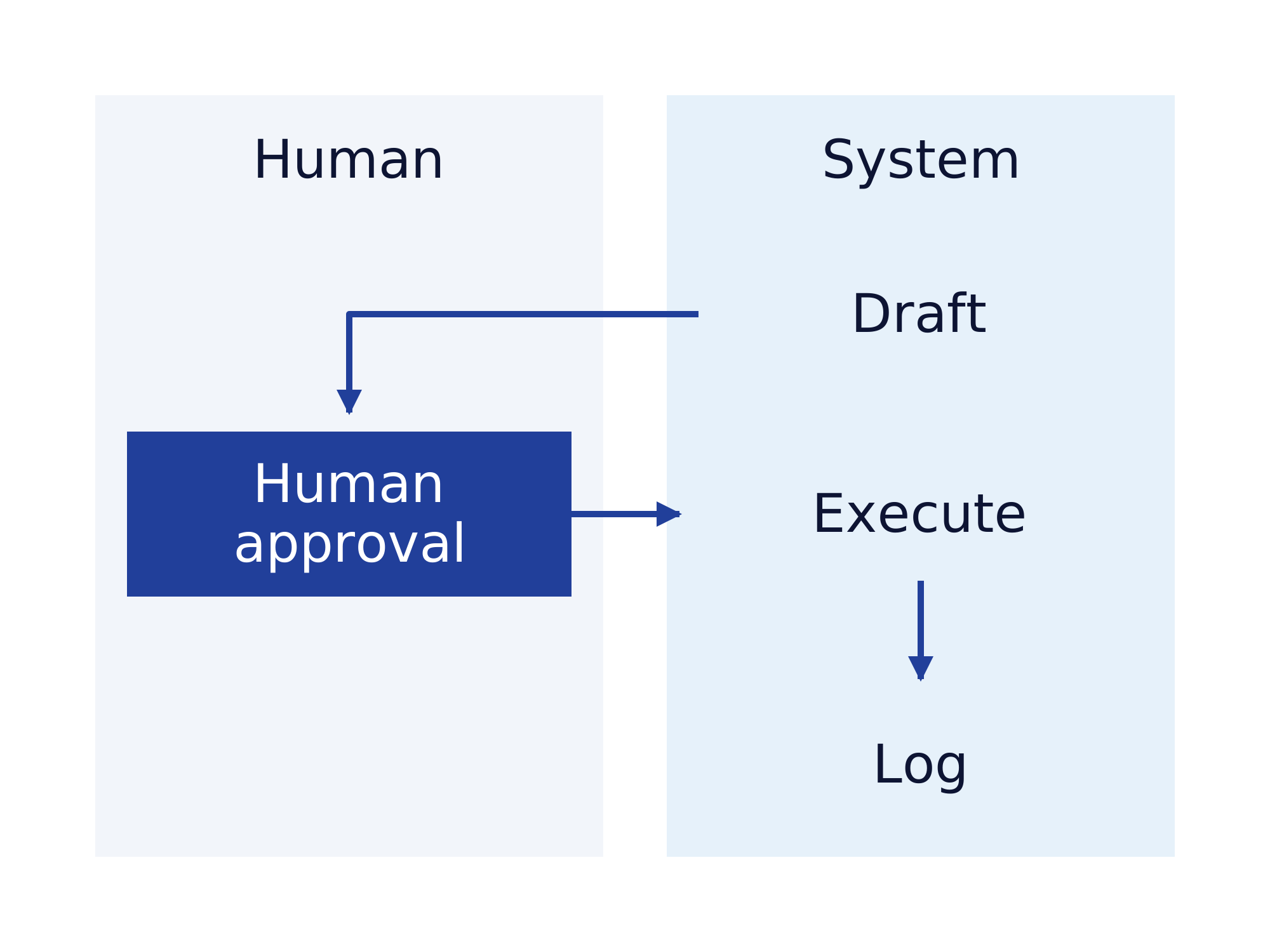
A workflow can prepare a response or proposed record change while a person checks the result. Define what the reviewer sees and which version the approval covers. If a recipient or amount changes afterward, the workflow should obtain another decision before executing the changed action. Include a route for rejected requests and unanswered approval tasks.
n8n supports human review before selected AI tool calls, pausing execution for approval or denial. Agree whether the business task needs an AI component at all. A fixed mapping or a predictable calculation can remain ordinary workflow logic, with a model limited to the part needing interpretation.
Handle failed runs and repeated events deliberately
An integration may receive the same event again, or lose the connection after the destination has already accepted a change. Agree how the workflow identifies completed actions before repeating them. Test whether a repeated inquiry produces a second customer record or sends the same response twice, and make the outcome visible to the process owner.
n8n error workflows can react to failed executions and notify the responsible team. Define the response to that alert and the information needed to investigate it. The handover should state when a person resumes a run and when the unfinished task returns to manual processing.
Accept the workflow and assign ongoing ownership
Use ordinary inputs and known exceptions supplied by the people doing the work. Check the destination record after each run and test rejected approval, expired access and an unavailable application. Record remaining manual cases alongside the successful tests, so acceptance reflects the agreed scope and the team knows which work still needs attention.
The delivery should include the agreed workflow configuration and instructions for investigating failures. Assign responsibility for credentials and future changes to connected applications. Measure the actual handling time over a defined period, including exception work, before extending the automation to additional processes or increasing the number of users.
n8n implementation with Gateflow from Frankfurt
Gateflow is a Frankfurt IT provider developing n8n workflows with application connections and process-specific checks. The Gateflow n8n development service includes configuration, acceptance findings and instructions for failed runs. Small companies can commission work primarily for Germany, Austria and Switzerland, agreeing project location, travel and availability before delivery.
Bring the current process and representative cases to the initial discussion. Ask Gateflow to distinguish workflow development from hosting or ongoing maintenance, with each responsibility stated in the proposal. A useful first scope ends with a tested business result and a person able to take over the operating instructions.
Business workflows and Finance Loop
Finance Loop is a European professional network for emerging technologies in finance and the editorial publisher of this guide. Finance Loop connects practitioners with people evaluating technology decisions for their businesses across borders. Gateflow is the service provider for the implementation described above, with the scope agreed directly between Gateflow and the customer.
Finance Loop supports professional exchange in these fields: Investment & Digital Assets, Payments & Digital Money, Digital Infrastructure & Sovereignty, and Risk & Compliance.